Expand your ERP value to give your team simpler apps, faster processes, and immediate efficiencies
While ERP systems bring coordination and agility to managing business activities, they can also bring frustration to users. Using standard ERP suites means you’re relying on their built-in, standardised functionalities. If you look to customise the solution, there’s no shortcut to reaching the outcomes you’re looking for. It becomes sheer hard work and, often, needs longer than anticipated lead-times.
For this Q&A, we invited Adam Wojtyniak, Infor M3 Senior Business Consultant at Columbus, to explain how Novacura Flow Connect overcomes such problems. He shares how it enables businesses to adapt their ERP system with minimal effort and at maximum speed. He also outlines how you can use its functions across whatever user interfaces you need; smartphones, tablets, computers, and handheld terminals.
The discussion also includes examples of efficiency improvements our customers have made with Novacura Flow. From 13 minutes saved per invoice, to a 50% reduction in on-boarding and training time, to a 34-hour process shrunk to six hours, they show the process transformation it’s possible to achieve. While the conversation focuses on Infor M3 integration, bear in mind Novacura Flow is designed to integrate with virtually any surrounding system.
What is Novacura Flow Connect and what problems does it address?
Adam: Basically, Flow Connect is an app builder. It’s as simple as that, and simplicity is what it delivers once you start using it. A flexible layer that sits as an extension on top of Infor M3, and other ERP systems, Flow Connect gives you the flexibility to create your own applications. They can be anything, from mobile apps for field-based teams, to portal pages and automated interactions, across any user interface.
The ‘extension’ part is that you define your business rules and overall policies in the online dedicated Infor M3 extension, or other ERP systems, and then personalise or tailor them into user-friendly, easy-to-navigate apps. This differs from typical warehouse management systems complete with their own integral rules and databases. In these examples, process execution isn’t that easy. Most enterprise-grade WMS platforms, for example, don’t give access to open code source. Even with the Infor M3 mobile extensions, making a simple modification involves copying entire transactions and then applying the modifications to them. Change is complicated in both cases. It can take days to create a simple modification. With Novacura, it takes minutes. It can sometimes take just seconds. Time to market is never a problem.
Looking at the problems that Flow Connect addresses, one of the most frustrating is the customisation you need to go through when you want to tailor apps more directly to your own processes. It can be cumbersome and time-consuming. It will probably be something you have to undertake with the vendor of your main ERP system. When that happens, you’re locked into the vendor and reliant on them for future changes, when you don’t really need to be.
Another challenging and integration-heavy barrier is when a business looks to combine numerous applications into one smooth process execution flow. That’s also time-consuming and costly. The outcome of all this is that after going through the entire customisation process, a business can end up finding that the apps created aren’t quite what had been hoped for. More changes are then required to make further adaptations. It’s like taking one step forward and one step back. Novacura Flow takes these problems away and makes everything simple, intuitive, and efficient. That’s what any company needs when it comes to designing its own processes.
What’s the headline benefit of Novacura Flow?
Adam: Novacura Flow has nothing to do with changing anything about a customer’s core ERP. Its value comes from how it helps you add or adapt processes, apps, to address those aspects of your business that a standardised approach doesn’t address. It helps customers make their business, and the way they run it, unique.
It adds another dimension to a company’s ERP, powered by real-time, specialised online connectors to the main system. In one single platform, it provides unlimited integration possibilities.
Novacura Flow doesn’t take the focus off the ERP, it sharpens it. It enables a business to get more value from its ERP by effectively enriching the capabilities within it. Everything you create using Novacura Flow is immediately visible in the core system, which remains the primary system of record. Master data, transactions, and reporting all stay in the ERP.
Is Novacura Flow Connect easy to use?
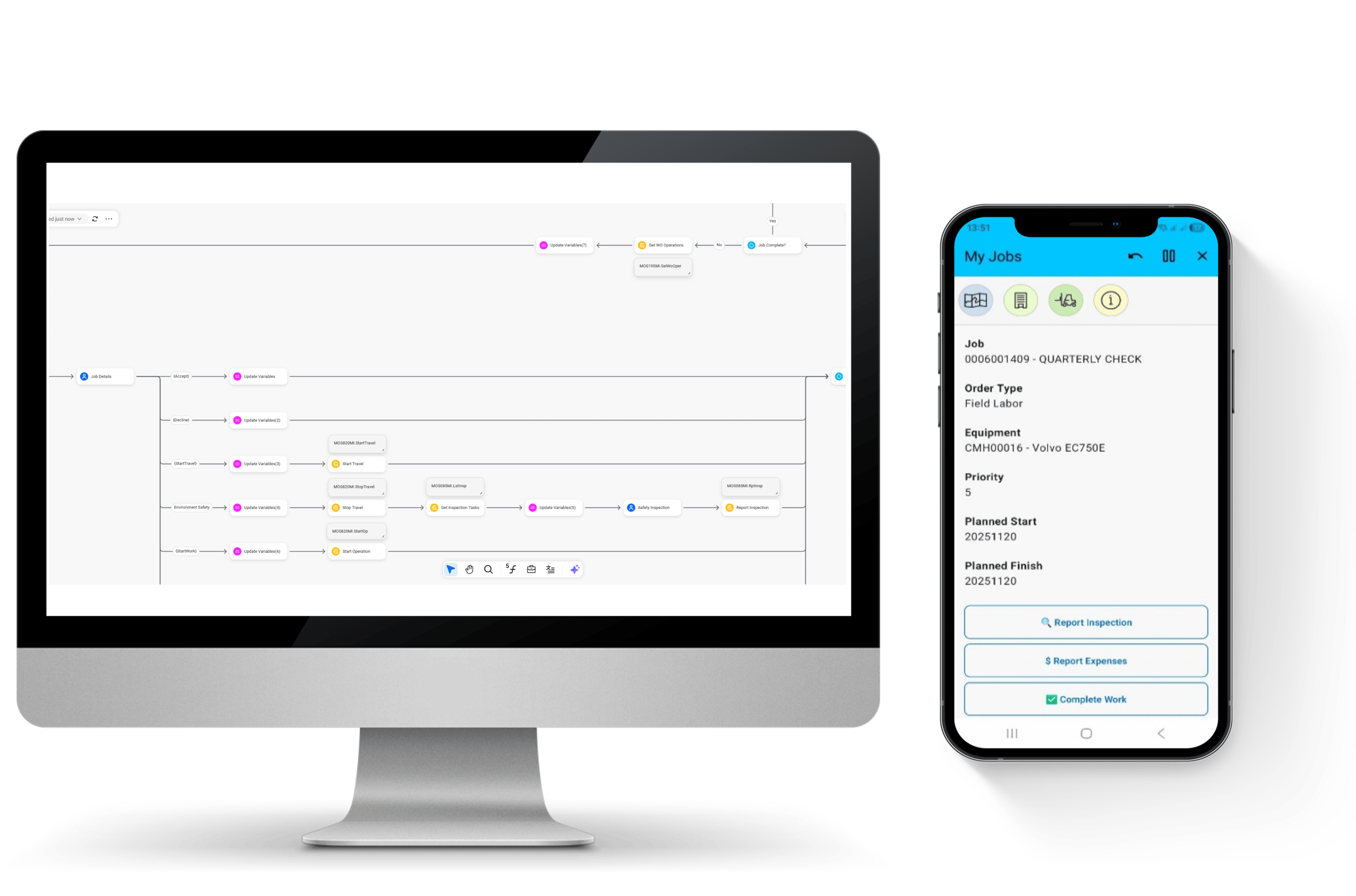
Adam: The most immediately obvious benefit is that tailoring simple apps with Novacura Flow Connect is via low code. So is most of the design functionality a company is likely to use. You create applications just by drawing business processes; involving minimal scripting. In my opinion, it couldn’t be easier. This means companies can innovate continuously; almost no delay between identifying a need, deciding how to address it, and getting the new app into the system and out to users.
The logic, workflows, and rules are all visual, like a template. When designing an app, Flow Connect’s predefined Flow Script modules and components enable faster development through reusable logic and integrations. While these modules and components need to be built initially, they can then be reused across apps instead of recreating the same functionality again and again. There’s also a library of drag-and-drop modular building blocks, known as Steps, that users can configure to define the workflow the way they want it.
Think about it as how you might use PowerPoint. It makes app designing no longer the domain of tech experts. When you’ve designed the app the way you want it, you can immediately release it to end users with one click. It then connects to the main ERP through a dedicated ERP connector.
Development time is minimal. This means that continuous improvement, and scope for innovation, can become genuinely continuous; have an idea, put it into practice.
Novacura Flow makes apps easy to implement too, not just easy to design. As soon as it’s built, an app can be put to use, working instantly on all platforms. Its low-code approach enables rapid deployment, minimises development time, and reduces costs. Integration with existing systems is seamless.
Does AI play a role in Flow Connect?
Adam: In 2026 we anticipate news from Novacura on this topic as they embed AI more and more into Flow Connect. Even so, right now it’s bringing a number of fresh efficiencies into how a company can work easier and faster with the platform. There’s a beta version of an AI-driven Flow Builder, an agent that can build a flow from scratch simply by using natural language prompts. In terms of scripting, there’s an AI-driven tool, called Flowscript Copilot.
Another available feature is the Custom Portlet within the Portal Page application. Using CSS and HTML, you can create tailored portlets. In simple terms, HTML is used to structure the content such as text, images, and buttons. CSS is used to control how the content looks, including colours, fonts, spacing, and layout. With the support of external AI tools, this code can be generated with minimal effort and then implemented in the platform to build a portlet with the desired functionality and design.
I believe the next natural step could be a shift in how users interact with such tools. Instead of relying only on written prompts, future users may communicate directly with AI agents through speech-to-text interfaces. These agents could ask follow-up questions, clarify objectives, challenge incomplete inputs, and then build workflows or applications accordingly. This is how enterprise software creation will become significantly more intuitive and accessible.
The headless ERP trend, particularly within Infor, is set to gain further momentum. As it does, platforms like Novacura Flow will be well positioned to create seamless end-to-end applications through the use of dedicated ION APIs. Headless ERP enables greater flexibility by decoupling the user interface from the ERP core. This enables you to build tailored applications and workflows on top of robust backend services without being constrained by standard front ends.
At the same time, the rise of AI-assisted or “vibe coding” introduces a new dynamic, one of accessibility. It enables more people to generate applications quickly, ‘democratising’ the process of app development. People don’t need to have any in-depth understanding of structure, maintainability, or long-term scalability.
In this sort of context, Novacura becomes even more relevant. Its governed foundation for app development delivers easy-to-use tools such as structured workflows, modular Steps, and controlled integrations. Rather than relying on opaque, AI-generated code, it ensures transparency and control, reducing risk. This makes it far more suitable for building complex, business-critical solutions.
Will people who work in the field, and are perhaps not always technically inclined, find it easy to use?
Adam: In my view, that’s actually one of the key benefits. Flow Connect makes it easier for people to use the digital processes they’re required to. These processes won’t be a barrier to them anymore. Not everybody is a wizard when it comes to using technology. But it shouldn’t stop them doing their jobs or, worse still, make them fearful of the processes.
On the factory floor, or in warehousing, or any of the other numerous roles along the supply chain, people do jobs where the skills required don’t necessarily focus on being adept with using digital devices. That’s particularly the case when the processes are multi-layered and require a level of logic from the user, on top of the logic within the app. The problem these people face is that much, or all, of the reporting or other processes they have to go through involves a digital device. Some can find this requirement to be a bit daunting, so the answer is to make the interface as simple as possible and let the device take care of the logic. That’s what Novacura Flow Connect does, delivering user interfaces that make sense to users.
We work with several organisations, for example in retail, where seasonal peaks require taking on additional staff, often in high numbers. It’s counter-productive for these sorts of companies to devote huge amounts of time to on-boarding seasonal staff and training them in how to use essential apps. We also work with businesses where their front-line workers aren’t technically inclined but need to be able to use certain systems or processes. Gaining the necessary skills in how to interact with an ERP system, for example, has traditionally involved training They would have needed to be taught which programmes to open, in which sequence, and what options to use at certain stages to complete the end-to-end process. All that is effectively ‘hidden’ behind the Novacura Flow app so that the entire process looks, and feels, natural and intuitive.
The way to resolve issues like these is to change the essential apps. Adapt them as necessary so that they achieve the same end-result but are completely intuitive for people to use. In achieving that result, improvements can be made to the apps to reduce multiple stages, thereby reducing the time taken. One further complication in such scenarios is that the requirements of the apps might change from year to year. If they need to be adapted each year, or season, or no matter how regularly, Flow Connect gives companies the agility to do that. It would be a mammoth exercise if it all had to be subject to the traditional approach to IT customisation every new season.
Solving business challenges: Can you outline specific industry examples of the sort of applications businesses can create with Flow Connect?
Adam: Let’s look at supply chain management, customer sales and service, and manufacturing. In all these industries, companies want real-time visibility and control. With Novacura Flow Connect, any organisation can easily build an application to serve its specific requirements.
For bringing control and reporting into a central point you can build a portal page, or dashboard, showing what’s happening, where and when. The apps you create feed into this central point.
In the supply chain, for example, you can build apps for goods-in control, outbound deliveries, inventory control, stock movement, and any other discipline involved. The possibilities of drilling into any function or process across the supply chain are limitless. Each app created is another step in improving efficiency on the front-line and easing the reporting burden of the people involved in it.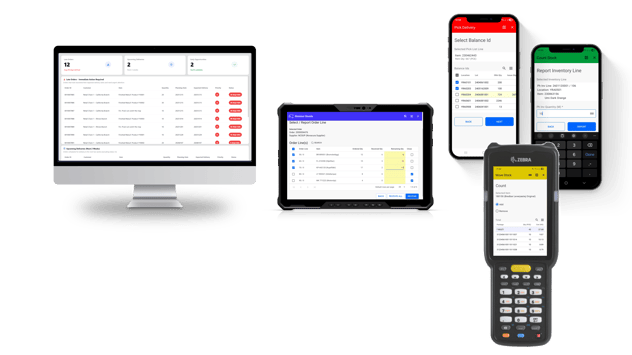
In customer sales and service, the ongoing challenge is impressing customers with efficient processes that inspire confidence and reinforce customer satisfaction. For example, managing daily assignments for field technicians supports their ability to run smoothly throughout the day. Flow Connect in itself is a platform, but it provides the capability to build a service order report app to provide full visibility of customer and equipment details. This enables technicians to accept jobs and report time, materials, expenses, and work performed.
Another example is when it comes to making sure the customer is satisfied with the quality of what’s supplied. An inspect quality app for use during goods receipt allows users to document any defects, with comments and photos; structured evidence to support supplier claims that can be shared directly via email.
In manufacturing operations, one of the biggest challenges is ensuring the production line keeps running smoothly. Lots of factors can impact this. They include supply chain disruption, material or components availability, and being able to coordinate multiple projects at the same time.
By building a shop floor reporting portal page with Flow Connect, manufacturers can create an operational dashboard to provide a coordinated view of everything that’s happening, has been completed, or is scheduled. From one centralised interface, users can browse active manufacturing order status and assigned BOMs, report materials and operations, access related drawings from IDM, and complete the final put-away.
Do you have any use cases that demonstrate results businesses have achieved with Flow Connect?
Adam: I’ll talk about three examples, all highlighting major time savings and efficiency gains. One is in a food production line reporting situation, one in financial processing, and the third in on-boarding and training time.
- Production line reporting | Don’t write it down, tap it in
The people affected by this project were all food-making specialists, and not trained users in software systems. They were required to use complex reporting processes involving multiple steps through filtering, locating operations, put-away, and quality inspection. Columbus studied these processes, to find a way of making life easier for them. The focus of this foundational work was to explore the time savings, the simplicity, and productivity they could gain if they moved their reporting processes onto Infor M3. We found that 798 reporting actions were required across 117 manufacturing orders. This came to a total of 34 hours spent, par day, on making the entries.
Columbus and Novacura simplified the entire reporting process. Against the previous 34 hours per day swallowed up in reporting, Novacura had it all complete in just short of 6 hours. It’s an inspiring example of the results a company might expect when it looks to Flow Connect to simplify processes.
- Financial processing | Eliminate the unnecessary
This project with Columbus and Novacura was about improving the handling, validation, and approval of supplier invoices. The customer’s goal was to replace a fragmented, error-prone invoice flow with a controlled, transparent, and auditable approval process for validating invoices before they reached M3. The company wanted to streamline the entering of invoice details, from PDF and document formats, into M3. Each invoice went through a multi-stage process that involved purchasers, accountants, and directors. Multilevel approval of this nature isn’t supported in M3’s built-in supplier invoice module.
We built a new invoice approval app in Flow Connect which interfaced the customer’s invoice capture solution and Infor M3. The app saved an estimated 13-minute processing time for each invoice, through automated invoice-to-order matching via preconfigured workflows and a simple one-click transfer to Infor M3.
- On-boarding and training | Cut out the complexity
The third example was for a large parts distributor and agent in the automotive sector. During an analysis of how the processes would work using Infor M3 and other applications from the Infor portfolio, the customer realised that the complexity of the applications would create challenges for staff. Instead of enhancing efficiencies, the apps risked holding them back. We’ve created a range of mobile apps that support key in-house, inbound, and outbound logistics processes for store personnel. These apps have a far more user-friendly interface and remove any need for staff to interact directly with M3. It provides a simple, intuitive, and highly efficient workflow that reduces complexity for employees while improving the customer experience. It connects Infor M3, Microsoft Azure Service Layer, and a Payment Service Provider.
Store personnel can now manage the full customer order journey through a single interface. They can scan and add products to the basket. They can register customer details, check stock availability, confirm product locations, and display prices. To complete a transaction, they can select the customer’s preferred payment method and connect with the customer’s bank.
How can Columbus support organisations with Novacura Flow Connect?
Adam: I think we bring three core areas of advantage to helping solve our customers’ business challenges: industry experience, technology partnerships, and a strong and proven implementation methodology.
From an industry experience perspective, we’ve been delivering business-critical solutions for major enterprises for more than thirty years, with a focus on food and beverage, manufacturing, retail, distribution, rental and equipment. The result is that, as a team, we have deep experience of the challenges faced by these sectors, and we understand the best practices that help to overcome them.
Our technology partnerships, all with leaders in their particular areas of expertise, add another dimension. In this case, the relationships we have with both Infor and Novacura give us insight into how our customers can get the most from their use of the technologies.
The third advantage we bring is the way in which we help customers to achieve success. Our own established delivery, or implementation, methodology, is known as OnTarget. While the methodology focuses on the pragmatic side of getting things done smoothly, it pays close attention to strategy, change management, and ongoing innovation after go-live. By following these essential stages, we build a bridge between business and technical knowledge. This drives great results and fast return in investment.
Finally, we can also assist in other areas that may crop up along the way, such as data migration, improving data clarity, and shaping a robust data strategy to ensure stable operations into the future, and ongoing business growth.
If you’d like to find out more about gaining real agility for your ERP and, more importantly, for supporting your teams with tools they’ll love working with, our experts are always happy to help.
