ERP and WMS: Choosing the right approach to warehouse management
ERP and WMS both support warehouse operations, but their capabilities can differ significantly. This raises an important question for businesses: when is a dedicated WMS worth investing in?
In this Q&A, we speak with Mads Stenbye, Solution Director for Infor M3, and Adam Wojtyniak, Senior Business Consultant for M3 at Columbus, about the differences between ERP and WMS, when a dedicated solution makes sense and the key factors businesses should consider before investing.
What’s the difference between ERP and WMS?
Mads: Many ERP systems have a built-in solution that caters to warehouse management. However, the capabilities are often basic. A dedicated WMS helps businesses optimise the movement of goods within their warehouse, improving productivity and overall operational efficiency.
Adam: One of the main differences is that Infor WMS has its own database, with functionality specifically designed for warehouse operations. When businesses use an ERP with additional applications or extensions, performance can depend on the ERP’s API layer. If those APIs are slow, the extension may not improve response times.
With Infor WMS, much of the functionality is already built into the solution. For distribution centres handling large volumes and requiring sophisticated picking and put-away processes, investing in a dedicated WMS often makes more sense than developing extensive custom functionality within the ERP.
When is an ERP system enough for warehouse management?
Mads: It depends on how much distribution is part of an organisation’s business model. For example, a food and beverage manufacturer that produces goods in bulk and sells full pallets or truckloads to another company that handles distribution might not need a dedicated WMS. The warehouse management capabilities within its ERP system will often be sufficient.
Dairy producers, on the other hand, often have significant distribution operations because of the short shelf life of their products. They need to move goods directly from the dairy to supermarkets, often combining milk, cheese and other products on mixed pallets. This creates more complexity in how goods are picked, packed and moved through the warehouse. In those environments, having a dedicated WMS is important.
What additional capabilities can a dedicated WMS provide?
Mads: One area is warehouse automation, which is becoming more accessible, especially with robotics. It’s no longer just large companies that are investing in automated warehousing. Smaller businesses can also introduce solutions that automatically retrieve goods and bring them to warehouse employees. A dedicated WMS helps manage the integration with this equipment.
Another important area is labour management. Many warehouses are labour-intensive, so being able to forecast staffing requirements, plan different types of picking jobs and schedule teams across warehouse zones makes a significant difference. A WMS also helps optimise the physical movement of goods, allowing warehouse employees to spend less time travelling between locations and more time productively handling goods.
There are also specialised capabilities such as third-party logistics (3PL) billing. A dedicated WMS supports businesses providing warehousing services to other companies, including storing goods, labelling and repacking products. Voice picking is another example, allowing employees to interact with the system without relying solely on handheld scanners.
Adam: Another point worth highlighting is that when a business invests in a dedicated WMS, it gains access to a wide range of pre-built functionality. For example, businesses might want to optimise picking routes, use ABC classification or introduce more sophisticated put-away processes. Some of these capabilities are available within ERP systems, but Infor WMS offers more advanced functionality out of the box.
Much of this can be configured within the system, reducing the need for custom development. This also changes how implementation projects are delivered. Rather than relying heavily on developers to create custom extensions, functional consultants can configure and activate the capabilities already available.
ERP vs WMS: Warehouse capabilities compared
The table below provides a general comparison of ERP warehouse functionality and the additional capabilities available in dedicated WMS solutions.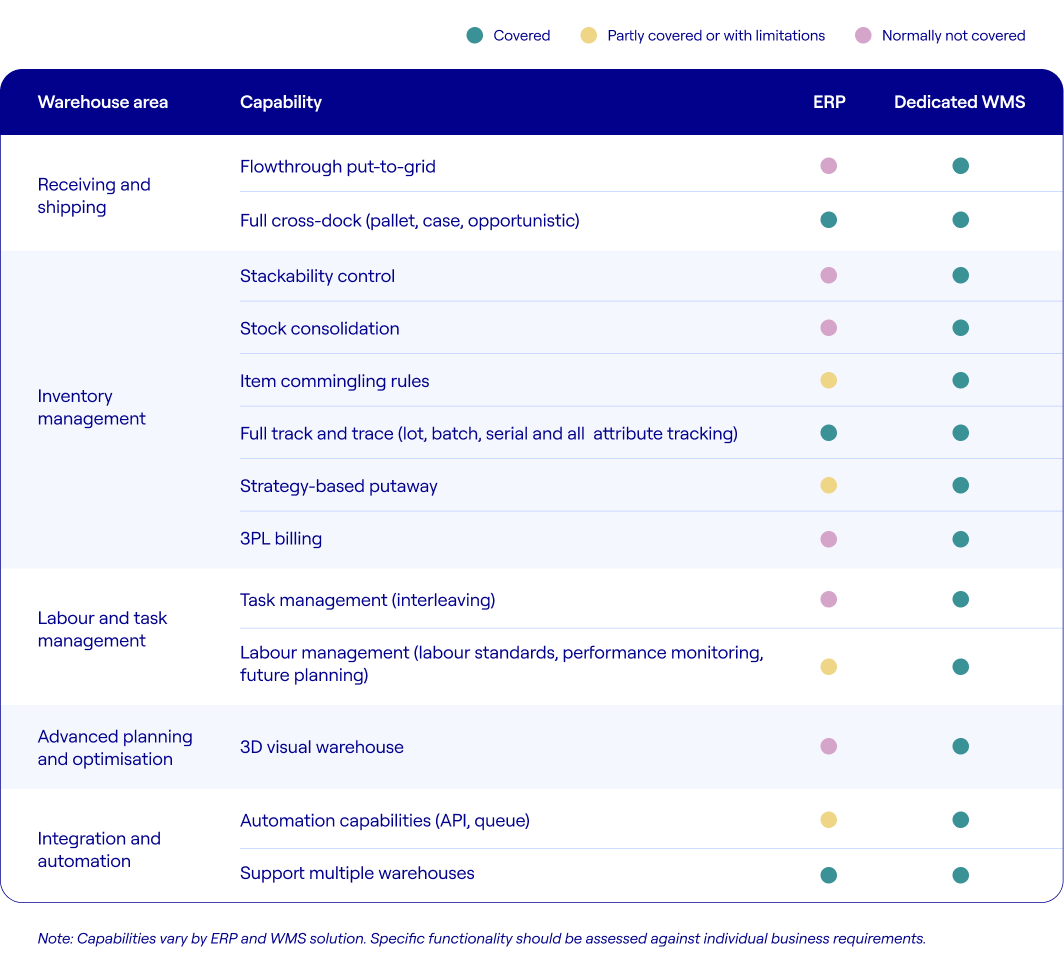
Can a dedicated WMS integrate with an existing ERP system?
Mads: Yes. One of the advantages of a best-of-breed solution like Infor WMS is that it can integrate with different ERP systems, including Infor M3 and Microsoft Dynamics 365. Infor WMS operates independently as a cloud-based solution, meaning the existing ERP doesn’t need to be in the cloud.
For example, organisations running M3 on-premises can still implement Infor WMS by integrating the two systems. This allows businesses to introduce more advanced warehouse management capabilities without replacing their existing ERP system.
Should ERP and WMS be implemented at the same time?
Mads: ERP and WMS can be implemented separately or together, depending on the business requirements. One of the benefits of implementing them at the same time is that they can be managed as one integrated project.
Working with a single implementation partner also makes the process easier. Instead of managing multiple suppliers and coordinating their work, businesses have one partner responsible for the overall delivery and making sure both systems work together.
Adam: Sports retailer Stadium is a good example of how ERP and WMS can be implemented together. The company selected Infor CloudSuite Fashion and Infor WMS to modernise its ERP and warehouse operations, with Columbus as its implementation partner. We’re managing ERP and WMS as one project, with a single solution architect overseeing both systems to make sure they’re integrated and aligned with the customer’s requirements.
Businesses may not always know which processes should be handled within their ERP and which should sit within the WMS. That’s where working with a partner like Columbus brings value. Our expertise across ERP and WMS helps customers make informed decisions about which processes should be managed in each system. We then work together to design an integrated solution around their needs.
How can businesses decide whether they need ERP warehouse functionality or a dedicated WMS?
Mads: Businesses should start by understanding their requirements. For some organisations, the need for a dedicated WMS is clear, while others can manage their warehouse operations using the capabilities within their ERP system.
There’s also a middle ground where a more detailed assessment is needed. This can begin with some straightforward questions: What are the order volumes? How complex are the warehouse processes? What capabilities are required? From there, we can help businesses determine whether investing in a dedicated WMS makes sense and identify the right approach based on their operational requirements.
Get expert guidance on ERP and WMS from Columbus
Whether you’re looking to improve your existing ERP warehouse processes or considering a dedicated warehouse management system, we can help assess your requirements and identify the right approach. Get in touch with our team using the contact card below.
